YES! The embedded AcerLabs USB M5237 controller of the DS10 is disabled by default on
recent versions of SRM and you need to perform
*some "tricks"*. Beware that it's unstable and has reasons why it got killed off in the first place. Oops

.
SRM versions up until v5.7 had USB controller enabled in them until they started disabling it since v5.8. It seems like that having the Ali USB controller enabled doesn't break stuff in itself, but that the DE500b NICs start misbehaving and BSODing the machine after the first reboot of the Windows install.
(possible workaround idea by reverting whatever changes are being done by the drivers or whatever to make it boot each time?)
Prerequisites:
DEC Alpha Firmware Update CD-ROM (Mid-2000) burned to a... CD
a DS10 with a CD-ROM drive and without working USB!
SRM+AlphaBIOS downgrade steps:
1. Boot into SRM
(hold the halt button if set to AlphaBIOS as default)
2. Type
boot dqa0
(or whatever your CD-ROM uses as the device name)
3. Skip the fw update text and wait for the
Bootfile: prompt where you can use the default one
5. Wait for it to reboot and perform the
update command on the UPD> prompt
6. Continue with all downgrade warnings and wait for it to update
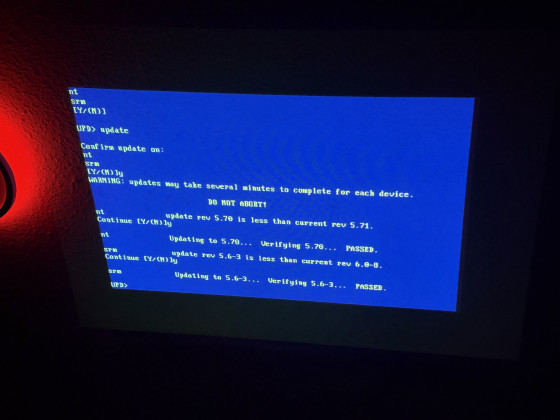
- Continuing through the downgrade warnings, don't be scared.
7. Reboot the machine with the
exit command
AlphaBIOS pages:
Some of the visible changes in AlphaBIOS
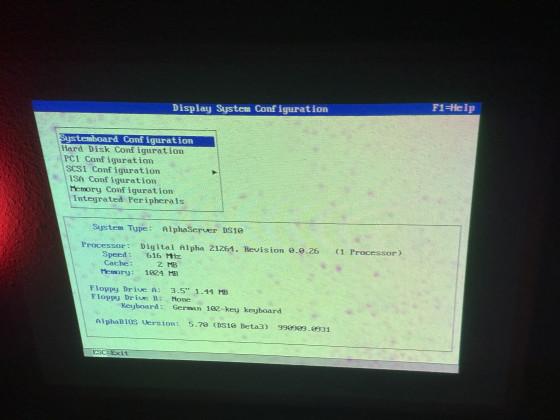
- AlphaBIOS 5.70 (DS10 Beta3) 990909.0931
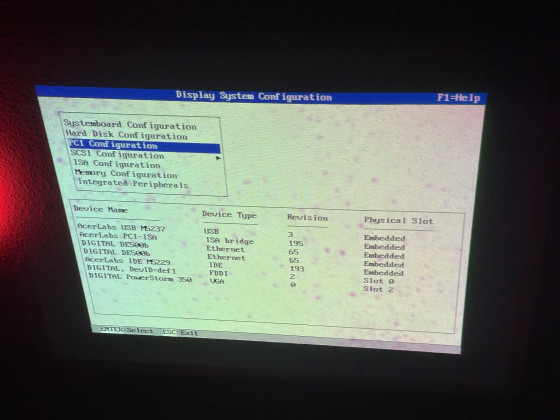
- PCI Configuration, now with the AcerLabs USB M5237 controller
SRM "show config" output:
Code: Select all
>>>show config
                        COMPAQ AlphaServer DS10 616 MHz

SRM Console:    V5.6-3
PALcode:        OpenVMS PALcode V1.69-59, Tru64 UNIX PALcode V1.62-54

Processors
CPU 0           Alpha 21264-0 616 MHz   SROM Revision: V1.18.208
                Bcache size: 2 MB

Core Logic
Cchip           DECchip 21272-CA Rev 2
Dchip           DECchip 21272-DA Rev 2
Pchip 0         DECchip 21272-EA Rev 2

TIG             Rev 2.1
Arbiter         Rev 7.30 (0xfe)

MEMORY

Array #       Size     Base Addr
-------    ----------  ---------
   0         512 MB    000000000
   1         512 MB    020000000

Total Bad Pages = 0
Total Good Memory = 1024 MBytes


PCI Hose 00
     Bus 00  Slot 01: Acer Labs M1543C USB

     Bus 00  Slot 07: Acer Labs M1543C
                                                         Bridge to Bus 1, ISA
     Bus 00  Slot 09: DE500-BA Network Controller
                                   ewa0.0.0.9.0          08-00-2B-86-E5-EB
     Bus 00  Slot 11: DE500-BA Network Controller
                                   ewb0.0.0.11.0         08-00-2B-86-E3-52
     Bus 00  Slot 13: Acer Labs M1543C IDE
                                   dqa.0.0.13.0
                                   dqa0.0.0.13.0          CD-224E
                                   dqb0.0.1.13.0          ST320014 A
                                   dqb1.1.1.13.0          IBM-DJNA -352030
     Bus 00  Slot 14: DEC PCI FDDI
                                   fwa0.0.0.14.0         00-60-B0-58-3F-CC
     Bus 00  Slot 16: PowerStorm 350


ISA
Slot    Device  Name            Type         Enabled  BaseAddr  IRQ     DMA
0
        0       MOUSE           Embedded        Yes     60      12
        1       KBD             Embedded        Yes     60      1
        2       COM1            Embedded        Yes     3f8     4
        3       COM2            Embedded        Yes     2f8     3
        4       LPT1            Embedded        No      3bc     7
        5       FLOPPY          Embedded        Yes     3f0     6       2
W2k 5.00.2128 proof:
All of this now lets you to boot into Windows and see the fun of working USB!
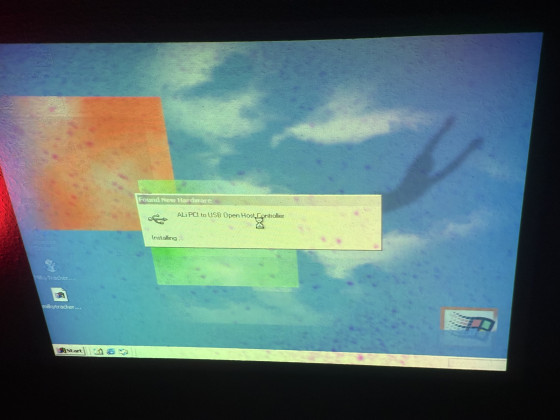
- ALi PCI to USB Open Host Controller installing from the W2k inbox drivers
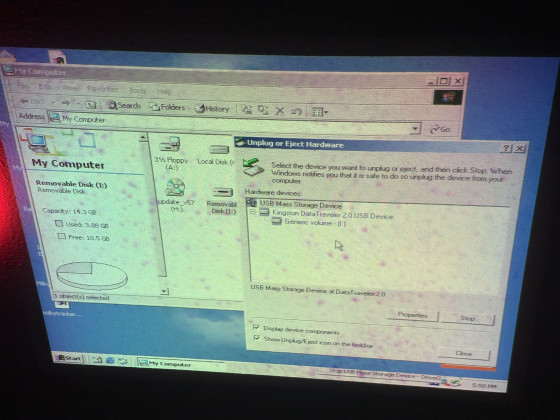
- Working USB Mass Storage on DS10
Linux(???!!?!?!?11!??):
As you can see by this dmesg snippet, if you use linux it works just fine, both usb and Nic and it survives reboots even!
Code: Select all
[    0.000000] Linux version 6.8.7-t2 (root@7950x) (alpha-t2-linux-gnu-kcc (T2 SDE) 13.2.1 20240405, GNU ld (GNU Binutils) 2.42) #1 SMP Tue Apr 23 02:47:49 CEST 2024
[    0.000000] Booting GENERIC on Tsunami variation Webbrick using machine vector Webbrick from SRM
[    0.000000] Major Options: SMP MAGIC_SYSRQ
[    0.000000] Command line: root=/dev/sdb2
[    0.000000] memcluster 0, usage 1, start        0, end      256
[    0.000000] memcluster 1, usage 0, start      256, end   130978
[    0.000000] memcluster 2, usage 1, start   130978, end   131072
[    0.000000] Initial ramdisk at: 0x(____ptrval____) (22410340 bytes)
[    0.000000] 2048K Bcache detected; load hit latency 18 cycles, load miss latency 112 cycles
[    0.000000] Console graphics on hose 0
[    0.000000] SMP: 1 CPUs probed -- cpu_present_mask = 1
[    0.000000] Zone ranges:
[    0.000000]   DMA      [mem 0x0000000000000000-0x00000fffffffdfff]
[    0.000000]   Normal   empty
[    0.000000] Movable zone start for each node
[    0.000000] Early memory node ranges
[    0.000000]   node   0: [mem 0x0000000000000000-0x000000003fffffff]
[    0.000000] Initmem setup node 0 [mem 0x0000000000000000-0x000000003fffffff]
[    0.000000] percpu: Embedded 9 pages/cpu s32192 r8192 d33344 u73728
[    0.000000] pcpu-alloc: s32192 r8192 d33344 u73728 alloc=9*8192
[    0.000000] pcpu-alloc: [0] 0
[    0.000000] Kernel command line: root=/dev/sdb2
[    0.000000] Dentry cache hash table entries: 131072 (order: 7, 1048576 bytes, linear)
[    0.000000] Inode-cache hash table entries: 65536 (order: 6, 524288 bytes, linear)
[    0.000000] Sorting __ex_table...
[    0.000000] Built 1 zonelists, mobility grouping on.  Total pages: 130048
[    0.000000] mem auto-init: stack:all(zero), heap alloc:off, heap free:off
[    0.000000] Memory: 990864K/1048576K available (7873K kernel code, 11164K rwdata, 2444K rodata, 336K init, 283K bss, 57712K reserved, 0K cma-reserved)
[    0.000000] SLUB: HWalign=64, Order=0-3, MinObjects=0, CPUs=1, Nodes=1
[    0.000000] rcu: Hierarchical RCU implementation.
[    0.000000] rcu: 	RCU restricting CPUs from NR_CPUS=32 to nr_cpu_ids=1.
[    0.000000] 	Tracing variant of Tasks RCU enabled.
[    0.000000] rcu: RCU calculated value of scheduler-enlistment delay is 102 jiffies.
[    0.000000] rcu: Adjusting geometry for rcu_fanout_leaf=16, nr_cpu_ids=1
[    0.000000] NR_IRQS: 32784
[    0.000000] rcu: srcu_init: Setting srcu_struct sizes based on contention.
[    0.000000] HWRPB cycle frequency bogus, and unable to estimate a proper value!
[    0.009765] Console: colour VGA+ 80x25
[    0.009765] printk: legacy console [tty0] enabled
[    0.011718] Calibrating delay loop... 1216.52 BogoMIPS (lpj=593408)
[    0.020507] pid_max: default: 32768 minimum: 301
[    0.020507] Mount-cache hash table entries: 2048 (order: 1, 16384 bytes, linear)
[    0.020507] Mountpoint-cache hash table entries: 2048 (order: 1, 16384 bytes, linear)
[    0.023437] SMP mode deactivated.
[    0.024414] RCU Tasks Trace: Setting shift to 0 and lim to 1 rcu_task_cb_adjust=1.
[    0.025390] Performance events: No support for your CPU.
[    0.025390] rcu: Hierarchical SRCU implementation.
[    0.025390] rcu: 	Max phase no-delay instances is 390.
[    0.026367] smp: Bringing up secondary CPUs ...
[    0.026367] smp: Brought up 1 node, 1 CPU
[    0.026367] SMP: Total of 1 processors activated (1221.77 BogoMIPS).
[    0.027343] devtmpfs: initialized
[    0.035156] clocksource: jiffies: mask: 0xffffffff max_cycles: 0xffffffff, max_idle_ns: 1866466235866741 ns
[    0.035156] futex hash table entries: 256 (order: 1, 16384 bytes, linear)
[    0.035156] pinctrl core: initialized pinctrl subsystem
[    0.037109] NET: Registered PF_NETLINK/PF_ROUTE protocol family
[    0.038085] thermal_sys: Registered thermal governor 'step_wise'
[    0.039062] PCI host bridge to bus 0000:00
[    0.039062] pci_bus 0000:00: root bus resource [io  0x0000-0x1ffffff]
[    0.039062] pci_bus 0000:00: root bus resource [mem 0x00000000-0x3fffffff]
[    0.039062] pci_bus 0000:00: No busn resource found for root bus, will use [bus 00-ff]
[    0.039062] pci 0000:00:01.0: [10b9:5237] type 00 class 0x0c0310 conventional PCI endpoint
[    0.039062] pci 0000:00:01.0: BAR 0 [mem 0x010b0000-0x010b0fff]
[    0.039062] pci 0000:00:07.0: [10b9:1533] type 00 class 0x060100 conventional PCI endpoint
[    0.040039] pci 0000:00:09.0: [1011:0019] type 00 class 0x020000 conventional PCI endpoint
[    0.040039] pci 0000:00:09.0: BAR 0 [io  0x1100-0x117f]
[    0.040039] pci 0000:00:09.0: BAR 1 [mem 0x010b2000-0x010b23ff]
[    0.040039] pci 0000:00:09.0: ROM [mem 0x01000000-0x0103ffff pref]
[    0.040039] pci 0000:00:0b.0: [1011:0019] type 00 class 0x020000 conventional PCI endpoint
[    0.040039] pci 0000:00:0b.0: BAR 0 [io  0x1180-0x11ff]
[    0.040039] pci 0000:00:0b.0: BAR 1 [mem 0x010b2400-0x010b27ff]
[    0.041015] pci 0000:00:0b.0: ROM [mem 0x01040000-0x0107ffff pref]
[    0.041015] pci 0000:00:0d.0: [10b9:5229] type 00 class 0x0101f0 conventional PCI endpoint
[    0.041015] pci 0000:00:0d.0: [Firmware Bug]: BAR 0: invalid; can't size
[    0.041015] pci 0000:00:0d.0: [Firmware Bug]: BAR 1: invalid; can't size
[    0.041015] pci 0000:00:0d.0: [Firmware Bug]: BAR 2: invalid; can't size
[    0.041015] pci 0000:00:0d.0: [Firmware Bug]: BAR 3: invalid; can't size
[    0.041015] pci 0000:00:0d.0: BAR 4 [io  0x1250-0x125f]
[    0.041015] pci 0000:00:0d.0: BAR 0 [io  0x01f0-0x01f7]: legacy IDE quirk
[    0.041015] pci 0000:00:0d.0: BAR 1 [io  0x03f6]: legacy IDE quirk
[    0.041015] pci 0000:00:0d.0: BAR 2 [io  0x0170-0x0177]: legacy IDE quirk
[    0.041015] pci 0000:00:0d.0: BAR 3 [io  0x0376]: legacy IDE quirk
[    0.041992] pci 0000:00:0f.0: [1000:000c] type 00 class 0x010000 conventional PCI endpoint
[    0.041992] pci 0000:00:0f.0: BAR 0 [io  0x1000-0x10ff]
[    0.041992] pci 0000:00:0f.0: BAR 1 [mem 0x010b2800-0x010b28ff]
[    0.041992] pci 0000:00:0f.0: BAR 2 [mem 0x010b1000-0x010b1fff]
[    0.041992] pci 0000:00:0f.0: ROM [mem 0x01080000-0x0109ffff pref]
[    0.042968] pci 0000:00:10.0: [10ba:0304] type 00 class 0x030000 conventional PCI endpoint
[    0.043945] pci 0000:00:10.0: BAR 0 [mem 0x40000000-0x43ffffff pref]
[    0.044921] pci 0000:00:10.0: BAR 1 [mem 0x44000000-0x45ffffff pref]
[    0.045898] pci 0000:00:10.0: BAR 2 [io  0x1260-0x1267]
[    0.046874] pci 0000:00:10.0: ROM [mem 0x010a0000-0x010affff pref]
[    0.049804] pci 0000:00:11.0: [1274:5000] type 00 class 0x040100 conventional PCI endpoint
[    0.049804] pci 0000:00:11.0: BAR 0 [io  0x1200-0x123f]
[    0.049804] pci: enabling save/restore of SRM state
[    0.050781] pci_bus 0000:00: busn_res: [bus 00-ff] end is updated to 00
[    0.050781] pci 0000:00:10.0: BAR 0 [mem 0x0c000000-0x0fffffff pref]: assigned
[    0.051757] pci 0000:00:10.0: BAR 1 [mem 0x0a000000-0x0bffffff pref]: assigned
[    0.052734] pci 0000:00:09.0: ROM [mem 0x09000000-0x0903ffff pref]: assigned
[    0.052734] pci 0000:00:0b.0: ROM [mem 0x09040000-0x0907ffff pref]: assigned
[    0.052734] pci 0000:00:0f.0: ROM [mem 0x09080000-0x0909ffff pref]: assigned
[    0.052734] pci 0000:00:10.0: ROM [mem 0x090a0000-0x090affff pref]: assigned
[    0.052734] pci 0000:00:01.0: BAR 0 [mem 0x090b0000-0x090b0fff]: assigned
[    0.052734] pci 0000:00:0f.0: BAR 2 [mem 0x090b1000-0x090b1fff]: assigned
[    0.052734] pci 0000:00:09.0: BAR 1 [mem 0x090b2000-0x090b23ff]: assigned
[    0.052734] pci 0000:00:0b.0: BAR 1 [mem 0x090b3000-0x090b33ff]: assigned
[    0.052734] pci 0000:00:0f.0: BAR 0 [io  0x8000-0x80ff]: assigned
[    0.052734] pci 0000:00:0f.0: BAR 1 [mem 0x090b4000-0x090b40ff]: assigned
[    0.052734] pci 0000:00:09.0: BAR 0 [io  0x8400-0x847f]: assigned
[    0.052734] pci 0000:00:0b.0: BAR 0 [io  0x8480-0x84ff]: assigned
[    0.052734] pci 0000:00:11.0: BAR 0 [io  0x8800-0x883f]: assigned
[    0.052734] pci 0000:00:0d.0: BAR 4 [io  0x8840-0x884f]: assigned
[    0.052734] pci 0000:00:10.0: BAR 2 [io  0x8850-0x8857]: assigned
[    0.053710] pci_bus 0000:00: resource 4 [io  0x0000-0x1ffffff]
[    0.053710] pci_bus 0000:00: resource 5 [mem 0x00000000-0x3fffffff]
[    0.057617] iommu: Default domain type: Translated
[    0.057617] iommu: DMA domain TLB invalidation policy: lazy mode
[    0.060546] pci 0000:00:10.0: vgaarb: setting as boot VGA device
[    0.060546] pci 0000:00:10.0: vgaarb: bridge control possible
[    0.060546] pci 0000:00:10.0: vgaarb: VGA device added: decodes=io+mem,owns=io+mem,locks=none
[    0.061523] vgaarb: loaded
[    0.061523] VFS: Disk quotas dquot_6.6.0
[    0.061523] VFS: Dquot-cache hash table entries: 1024 (order 0, 8192 bytes)
[    0.080078] NET: Registered PF_INET protocol family
[    0.080078] IP idents hash table entries: 16384 (order: 4, 131072 bytes, linear)
[    0.083007] tcp_listen_portaddr_hash hash table entries: 512 (order: 0, 8192 bytes, linear)
[    0.083007] Table-perturb hash table entries: 65536 (order: 5, 262144 bytes, linear)
[    0.083007] TCP established hash table entries: 8192 (order: 3, 65536 bytes, linear)
[    0.083007] TCP bind hash table entries: 8192 (order: 5, 262144 bytes, linear)
[    0.084960] TCP: Hash tables configured (established 8192 bind 8192)
[    0.084960] UDP hash table entries: 512 (order: 1, 16384 bytes, linear)
[    0.084960] UDP-Lite hash table entries: 512 (order: 1, 16384 bytes, linear)
[    0.084960] NET: Registered PF_UNIX/PF_LOCAL protocol family
[    0.085937] pci 0000:00:09.0: CLS mismatch (32 != 64), using 64 bytes
[    0.085937] Using epoch 1980 for rtc year 46
[    0.086914] Trying to unpack rootfs image as initramfs...
[    0.100585] platform rtc-alpha: registered as rtc0
[    0.100585] platform rtc-alpha: setting system clock to 2026-03-31T00:35:17 UTC (1774917317)
[    0.101562] Initialise system trusted keyrings
[    0.102539] workingset: timestamp_bits=46 max_order=17 bucket_order=0
[    0.102539] Key type asymmetric registered
[    0.102539] Asymmetric key parser 'x509' registered
[    0.103515] Block layer SCSI generic (bsg) driver version 0.4 loaded (major 252)
[    0.103515] io scheduler mq-deadline registered
[    0.103515] isapnp: Scanning for PnP cards...
[    0.456054] isapnp: No Plug & Play device found
[    0.846679] Serial: 8250/16550 driver, 4 ports, IRQ sharing disabled
[    0.847655] serial8250: ttyS0 at I/O 0x3f8 (irq = 4, base_baud = 115200) is a 16550A
[    0.852538] serial8250: ttyS1 at I/O 0x2f8 (irq = 3, base_baud = 115200) is a 16550A
[    0.881835] loop: module loaded
[    0.881835] PPP generic driver version 2.4.2
[    0.894530] serio: i8042 KBD port at 0x60,0x64 irq 1
[    0.895507] serio: i8042 AUX port at 0x60,0x64 irq 12
[    0.895507] NET: Registered PF_PACKET protocol family
[    0.919921] Loading compiled-in X.509 certificates
[    0.954101] Key type .fscrypt registered
[    0.954101] Key type fscrypt-provisioning registered
[    1.451171] input: AT Translated Set 2 keyboard as /devices/platform/i8042/serio0/input/input0
[    2.188475] Freeing initrd memory: 21880K
[    2.190428] Freeing unused kernel image (initmem) memory: 336K
[    2.190428] This architecture does not have kernel memory protection.
[    2.190428] Running /init as init process
[    2.190428]   with arguments:
[    2.190428]     /init
[    2.190428]   with environment:
[    2.190428]     HOME=/
[    2.190428]     TERM=linux
[    2.249998] udevd[39]: starting version 182
[    2.484373] tulip0: EEPROM default media type Autosense
[    2.484373] tulip0: Index #0 - Media 10baseT (#0) described by a 21142 Serial PHY (2) block
[    2.484373] tulip0: Index #1 - Media 10baseT-FDX (#4) described by a 21142 Serial PHY (2) block
[    2.484373] tulip0: Index #2 - Media 100baseTx (#3) described by a 21143 SYM PHY (4) block
[    2.484373] tulip0: Index #3 - Media 100baseTx-FDX (#5) described by a 21143 SYM PHY (4) block
[    2.491209] net eth0: Digital DS21142/43 Tulip rev 65 at Port 0x8400, 08:00:2b:86:e5:eb, IRQ 29
[    2.624022] tulip1: EEPROM default media type Autosense
[    2.624022] tulip1: Index #0 - Media 10baseT (#0) described by a 21142 Serial PHY (2) block
[    2.624022] tulip1: Index #1 - Media 10baseT-FDX (#4) described by a 21142 Serial PHY (2) block
[    2.624022] tulip1: Index #2 - Media 100baseTx (#3) described by a 21143 SYM PHY (4) block
[    2.624022] tulip1: Index #3 - Media 100baseTx-FDX (#5) described by a 21143 SYM PHY (4) block
[    2.657225] net eth1: Digital DS21142/43 Tulip rev 65 at Port 0x8480, 08:00:2b:86:e3:52, IRQ 30
[    2.757811] SCSI subsystem initialized
[    2.801756] usbcore: registered new interface driver usbfs
[    2.801756] usbcore: registered new interface driver hub
[    2.801756] usbcore: registered new device driver usb
[    2.937498] Warning! ehci_hcd should always be loaded before uhci_hcd and ohci_hcd, not after
[    2.968748] ohci-pci 0000:00:01.0: OHCI PCI host controller
[    2.968748] ohci-pci 0000:00:01.0: new USB bus registered, assigned bus number 1
[    2.968748] ohci-pci 0000:00:01.0: irq 10, io mem 0x090b0000
[    3.127928] sym0: <895> rev 0x2 at pci 0000:00:0f.0 irq 39
[    3.297849] libata version 3.00 loaded.
[    3.387693] sym0: Symbios NVRAM, ID 7, Fast-40, LVD, parity checking
[    3.387693] sym0: open drain IRQ line driver, using on-chip SRAM
[    3.387693] sym0: using LOAD/STORE-based firmware.
[    3.388670] sym0: SCSI BUS has been reset.
[    3.390623] scsi host0: sym-2.2.3
[    3.446287] scsi host1: pata_ali
[    3.448240] hub 1-0:1.0: USB hub found
[    3.449216] hub 1-0:1.0: 2 ports detected
[    3.491209] scsi host2: pata_ali
[    3.515623] ata1: PATA max MWDMA2 cmd 0x1f0 ctl 0x3f6 bmdma 0x8840 irq 14 lpm-pol 0
[    3.515623] ata2: PATA max MWDMA2 cmd 0x170 ctl 0x376 bmdma 0x8848 irq 15 lpm-pol 0
[    3.682615] ata1.00: ATAPI: CD-224E, 9.9A, max MWDMA2
[    3.682615] ata1.00: WARNING: ATAPI DMA disabled for reliability issues.  It can be enabled
[    3.682615] ata1.00: WARNING: via pata_ali.atapi_dma modparam or corresponding sysfs node.
[    3.708005] scsi 1:0:0:0: CD-ROM            TEAC     CD-224E          9.9A PQ: 0 ANSI: 5
[    3.870115] ata2.00: ATA-6: ST320014A, 3.07, max UDMA/100
[    3.870115] ata2.00: 39102336 sectors, multi 0: LBA
[    3.916990] scsi 2:0:0:0: Direct-Access     ATA      ST320014A        3.07 PQ: 0 ANSI: 5
[    4.717771] sr 1:0:0:0: [sr0] scsi3-mmc drive: 24x/24x cd/rw xa/form2 cdda tray
[    4.717771] cdrom: Uniform CD-ROM driver Revision: 3.20
[    4.726560] sr 1:0:0:0: Attached scsi CD-ROM sr0
[    4.813474] sd 2:0:0:0: [sda] 39102336 512-byte logical blocks: (20.0 GB/18.6 GiB)
[    4.813474] sd 2:0:0:0: [sda] Write Protect is off
[    4.813474] sd 2:0:0:0: [sda] Mode Sense: 00 3a 00 00
[    4.813474] sd 2:0:0:0: [sda] Write cache: enabled, read cache: enabled, doesn't support DPO or FUA
[    4.813474] sd 2:0:0:0: [sda] Preferred minimum I/O size 512 bytes
[    4.880856]  sda: sda1 sda2 < sda5 sda6 sda7 >
[    4.886716] sd 2:0:0:0: [sda] Attached SCSI disk
[    6.454098] random: crng init done
[    7.039058] scsi 0:0:1:0: Direct-Access     COMPAQ   BD0728A4C4       HPB4 PQ: 0 ANSI: 3
[    7.039058] scsi target0:0:1: tagged command queuing enabled, command queue depth 16.
[    7.041988] scsi target0:0:1: Beginning Domain Validation
[    7.048824] scsi target0:0:1: FAST-40 WIDE SCSI 80.0 MB/s ST (25 ns, offset 31)
[    7.052730] scsi target0:0:1: Domain Validation skipping write tests
[    7.052730] scsi target0:0:1: Ending Domain Validation
[    7.055660] sd 0:0:1:0: Power-on or device reset occurred
[    7.062496] sd 0:0:1:0: [sdb] 142264000 512-byte logical blocks: (72.8 GB/67.8 GiB)
[    7.333004] sd 0:0:1:0: [sdb] Write Protect is off
[    7.333004] sd 0:0:1:0: [sdb] Mode Sense: d3 00 10 08
[    7.922847] sd 0:0:1:0: [sdb] Write cache: disabled, read cache: enabled, supports DPO and FUA
[    9.700190]  sdb: sdb1 sdb2
[    9.701166] sd 0:0:1:0: [sdb] Attached SCSI disk
[   11.991204] EXT4-fs (sdb2): orphan cleanup on readonly fs
[   11.993157] EXT4-fs (sdb2): mounted filesystem 5e04dcf8-ebf6-40bf-a53e-dd6414040ef5 ro with ordered data mode. Quota mode: none.
[   14.914054] EXT4-fs (sdb2): re-mounted 5e04dcf8-ebf6-40bf-a53e-dd6414040ef5 r/w. Quota mode: none.
[   14.972648] EXT4-fs (sdb1): mounting ext3 file system using the ext4 subsystem
[   15.086906] EXT4-fs (sdb1): mounted filesystem 3be329f2-f2a8-42a1-a848-7597a95e68eb r/w with ordered data mode. Quota mode: none.
[   15.351554] zram: Added device: zram0
[   15.391593] zram0: detected capacity change from 0 to 405232
[   15.451163] Adding 202608k swap on /dev/zram0.  Priority:100 extents:1 across:202608k SS
[   15.863273] udevd[229]: starting version 182
[   16.114249] alim7101_wdt: Steve Hill <steve@navaho.co.uk>
[   16.114249] alim7101_wdt: ALi M7101 PMU not present - WDT not set
[   16.336905] input: PC Speaker as /devices/platform/pcspkr/input/input3
[   17.094717] input: PS2++ Logitech Wheel Mouse as /devices/platform/i8042/serio1/input/input4
[   17.964834] mousedev: PS/2 mouse device common for all mice
[   21.164051] NET: Registered PF_INET6 protocol family
[   21.166981] Segment Routing with IPv6
[   21.166981] In-situ OAM (IOAM) with IPv6
Code: Select all
00:01.0 USB controller: ULi Electronics Inc. USB 1.1 Controller (rev 03)
00:07.0 ISA bridge: ULi Electronics Inc. M1533/M1535/M1543 PCI to ISA Bridge [Aladdin IV/V/V+] (rev c3)
00:09.0 Ethernet controller: Digital Equipment Corporation DECchip 21142/43 (rev 41)
00:0b.0 Ethernet controller: Digital Equipment Corporation DECchip 21142/43 (rev 41)
00:0d.0 IDE interface: ULi Electronics Inc. M5229 IDE (rev c1)
00:0f.0 SCSI storage controller: Broadcom / LSI 53c895 (rev 02)
00:10.0 VGA compatible controller: Mitsubishi Electric Corp. AccelGALAXY A2100 [OEM Evans & Sutherland]
00:11.0 Multimedia audio controller: Ensoniq ES1370 [AudioPCI]