Compaq AlphaServer/AlphaStation DS10
- Morc Offline
- Posts: 197
- Joined: Fri Jul 19, 2024 12:23 pm
- Description: 21 | tatar z Biskupovej
Ak som sa volade omýleu tak na mňa kričte. - Contact:
Compaq AlphaServer/AlphaStation DS10
A thread of (ir)relevant things surrounding the DEC/Compaq/HP AlphaServer and AlphaStation DS10 (codename WebBrick) machines. Also branded as AlphaStation XP900 and AlphaServer/AlphaStation VS10 and TS10 due to some weird marketing shenanigans.
To Be Filled By O.E.M.
The Specification Things:
CPU: Alpha 21264 64-bit - Tsunami EV67 @ 616MHz
Chipset: 21272 Tsunami (co-based on x86 Ali chipsets) + Ali Aladdin ATA-33 M5229 IDE controller + AcerLabs M1533 PCI-ISA bridge
RAM: up to 2GB
GPU: rare Compaq PowerStorm 350 32MB 3D accelerator (or a regular S3 Trio64 is also applicable)
Expansion slots: 3x 64bit PCI-X slots, 1x 32bit PCI slot, 2x undocumented ISA slots
Ports: 2x DIGITAL DE500b FE (21143 Tulip) NICs, 2x USB ports @ AcerLabs Aladdin-V M5237 USB controller, 2x COM ports, LPT parallel port, PS/2 for mouse and keyboard
The Chronological Things:
02.07.2025 - Found a guy locally selling Alpha hardware, went to take a look.
02.07.2025 - Bought two AlphaServers and two AlphaStations from said person.
02.10.2025 - ByteFEST 2025 - took one of the Alphas to ByteFEST, tried a bunch of stuff with Leandro, nearly managed to install Windows NT 4.0
17.10.2025 - first audio experiments with Leandro
31.12.2025 - experiments with Windows 2000 5.00.2128 and Windows Whistler 2001 5.00.2210
17.01.2026 - additional audio experiments at home
26.04.2026 - finally a bit of working audio on NT
The Word Things:
The machine differences between the AlphaServers and AlphaStations are purely cosmetic and all of them report themselves as AlphaServer DS10 consistently.
Windows NT related:
The USB ports are disabled in-firmware in SRM with no way of accessing them, neither from UNIX environments, nor from Windows NT. See This Post to learn more!
AlphaBIOS integrated USB switch doesn't change anything?
Lack of ISA slots for more possible sound cards (maybe figure out the physical connector and a breakout or something?)
No support for SCSI booting and general issues with some stuff overall
NTFS issues?
AlphaBIOS SCSI/IDE related:
Drive size 33GB limit? There are release notes that mention bigger support but it doesn't seem to be the case?
Also make sure you have a 512b sector size on the drive and that AlphaBIOS doesn't say ***Off-Line*** on the said disk otherwise you won't be able to use it.
To Be Filled By O.E.M.
The Specification Things:
CPU: Alpha 21264 64-bit - Tsunami EV67 @ 616MHz
Chipset: 21272 Tsunami (co-based on x86 Ali chipsets) + Ali Aladdin ATA-33 M5229 IDE controller + AcerLabs M1533 PCI-ISA bridge
RAM: up to 2GB
GPU: rare Compaq PowerStorm 350 32MB 3D accelerator (or a regular S3 Trio64 is also applicable)
Expansion slots: 3x 64bit PCI-X slots, 1x 32bit PCI slot, 2x undocumented ISA slots
Ports: 2x DIGITAL DE500b FE (21143 Tulip) NICs, 2x USB ports @ AcerLabs Aladdin-V M5237 USB controller, 2x COM ports, LPT parallel port, PS/2 for mouse and keyboard
The Chronological Things:
02.07.2025 - Found a guy locally selling Alpha hardware, went to take a look.
02.07.2025 - Bought two AlphaServers and two AlphaStations from said person.
02.10.2025 - ByteFEST 2025 - took one of the Alphas to ByteFEST, tried a bunch of stuff with Leandro, nearly managed to install Windows NT 4.0
17.10.2025 - first audio experiments with Leandro
31.12.2025 - experiments with Windows 2000 5.00.2128 and Windows Whistler 2001 5.00.2210
17.01.2026 - additional audio experiments at home
26.04.2026 - finally a bit of working audio on NT
The Word Things:
The machine differences between the AlphaServers and AlphaStations are purely cosmetic and all of them report themselves as AlphaServer DS10 consistently.
Windows NT related:
The USB ports are disabled in-firmware in SRM with no way of accessing them, neither from UNIX environments, nor from Windows NT. See This Post to learn more!
AlphaBIOS integrated USB switch doesn't change anything?
Lack of ISA slots for more possible sound cards (maybe figure out the physical connector and a breakout or something?)
No support for SCSI booting and general issues with some stuff overall
NTFS issues?
AlphaBIOS SCSI/IDE related:
Drive size 33GB limit? There are release notes that mention bigger support but it doesn't seem to be the case?
Also make sure you have a 512b sector size on the drive and that AlphaBIOS doesn't say ***Off-Line*** on the said disk otherwise you won't be able to use it.
Windows NT 4.0 on The DS10™
Prerequisites:
The HAL floppy Windows NT Workstation 4.0 CD
AlphaBIOS instead of UNIX mode (set os_type NT in SRM or just boot into it using nt or alphabios)
sanity and a fair bit of luck.
Optional:
Drive formatting through AlphaBIOS, but can be nicely skipped in this instance
Installation Steps:
1. Put the CD and the HAL floppy in the machine and boot into AlphaBIOS
2. Select "Install Windows NT" from AlphaBIOS
3. Wait for the HAL prompt and select Compaq Professional Workstation XP1000 from the list.
4. Load additional SCSI/IDE drivers from the HAL floppy, mainly the IDE driver, otherwise you will bugcheck on 7B due to missing install root
5. Format the drive as usual (pick smaller partition sizes and also do FAT instead of NTFS)
6. Continue as usual and end up on the desktop
Post-Install Steps:
1. Install the ethernet drivers (use DEC PCI Ethernet DC21142) twice to get both NICs
2. Get on the internet and take a picture of a certain site!
3. Install the latest Service Pack 6 and also the rest of the drivers (eg. the Compaq PowerStorm 350 (pbxgdac) driver and also the sound card drivers for the ES1370)
4. Install Compaq FX!32 to enhance your computing capabilities with x86 emulation!
The HAL floppy Windows NT Workstation 4.0 CD
AlphaBIOS instead of UNIX mode (set os_type NT in SRM or just boot into it using nt or alphabios)
sanity and a fair bit of luck.
Optional:
Drive formatting through AlphaBIOS, but can be nicely skipped in this instance
Installation Steps:
1. Put the CD and the HAL floppy in the machine and boot into AlphaBIOS
2. Select "Install Windows NT" from AlphaBIOS
3. Wait for the HAL prompt and select Compaq Professional Workstation XP1000 from the list.
4. Load additional SCSI/IDE drivers from the HAL floppy, mainly the IDE driver, otherwise you will bugcheck on 7B due to missing install root
5. Format the drive as usual (pick smaller partition sizes and also do FAT instead of NTFS)
6. Continue as usual and end up on the desktop
Post-Install Steps:
1. Install the ethernet drivers (use DEC PCI Ethernet DC21142) twice to get both NICs
2. Get on the internet and take a picture of a certain site!
3. Install the latest Service Pack 6 and also the rest of the drivers (eg. the Compaq PowerStorm 350 (pbxgdac) driver and also the sound card drivers for the ES1370)
4. Install Compaq FX!32 to enhance your computing capabilities with x86 emulation!

Windows Whistler 2001 5.00.2210 AXP64 on the DS10
Prerequisites:
Windows Whistler 2001 5.00.2210 AXP64 CD
AlphaBIOS instead of UNIX mode (set os_type NT in SRM or just boot into it using nt or alphabios)
date and time set to the pre-timebomb
an old projector pointing at the ceiling due to more coolness factor possibilites
sanity and a fair bit of luck.
Whistler doesn't need any HAL floppies and works out of the box as far as things are considered.
Installation Steps:
1. Boot into AlphaBIOS and go into Hard Disk Setup
2. Add a fittingly "big" partition and format it to FAT in AlpbaBIOS (note 1: 2500MB was fine with 1GB of system ram, note 2: you don't need to make an another ARC partition if you already have one)
3. Save HDD changes
4. Put the installation CD in the machine, open Utilities and open Run Maintenance Program
5. Set the Program Name to axp64\setupldr and Location to CD: 5. You should be booting into the setup just normally.
You will encounter this rather interesting error though. No worries though, the setup apparently did change something and you just need to restart from step 4.
The setup will now nicely proceed to the installer, select the newly created partition and don't reformat it.

Windows 2000 5.00.2128 AXP32 on the DS10
Prerequisites:
Windows 2000 5.00.2128 AXP32
AlphaBIOS instead of UNIX mode (set os_type NT in SRM)
NO SYMBIOS SCSI CARDS IN PCI SLOTS (caused bugchecks before but is fine now?)
sanity and a fair bit of luck.
Installation Steps:
1. Boot into AlphaBIOS and go into Hard Disk Setup
2. Add a fittingly 4095MB big partition and format it to FAT in AlpbaBIOS (note, you don't need to make an another ARC partition if you already have one)
3. Save HDD changes and return back to the menu
4. Select "Install Windows NT" from AlphaBIOS
5. You should be booting into the setup just normally.
6. Proceed as usual and you should end up on the desktop in a certain amount of time.
Post-Install Steps:
1. Install the Compaq PowerStorm 350 (pbxgdac) driver (since the NT 4.0 driver works here just fine so far)
Windows 2000 5.00.2128 AXP32
AlphaBIOS instead of UNIX mode (set os_type NT in SRM)
NO SYMBIOS SCSI CARDS IN PCI SLOTS (caused bugchecks before but is fine now?)
sanity and a fair bit of luck.
Installation Steps:
1. Boot into AlphaBIOS and go into Hard Disk Setup
2. Add a fittingly 4095MB big partition and format it to FAT in AlpbaBIOS (note, you don't need to make an another ARC partition if you already have one)
3. Save HDD changes and return back to the menu
4. Select "Install Windows NT" from AlphaBIOS
5. You should be booting into the setup just normally.
6. Proceed as usual and you should end up on the desktop in a certain amount of time.
Post-Install Steps:
1. Install the Compaq PowerStorm 350 (pbxgdac) driver (since the NT 4.0 driver works here just fine so far)

RMC/SRM + AlphaBIOS Notes and Miscellaneous Info
Code: Select all
RMC> status
PLATFORM STATUS
Firmware Revision: V1.2
Server Power: ON
RMC Halt: Deasserted
RMC Power Control: ON
Power Supply: OK
System Fans: OK CPU Fan: OK
Temperature: 39.0°C (warnings at 55.0°C, power-off at 60.0°C)
Escape Sequence: ^[^[RMC
Remote Access: Disabled
RMC Password: not set
Alert Enable: Disabled
Alert Pending: YES
Init String:
Dial String:
Alert String:
Com1_mode: SNOOP
Last Alert: AC Loss
Watchdog Timer: 60 seconds
Autoreboot: OFF
Logout Timer: 20 minutes
User String:
Code: Select all
>>>show
auto_action BOOT
boot_dev dk*0.0.0.14.0
boot_file
boot_osflags A
boot_reset OFF
bootbios
bootdef_dev dk*0.0.0.14.0
booted_dev
booted_file
booted_osflags
char_set 0
com1_baud 9600
com1_flow SOFTWARE
com1_mode SNOOP
com1_modem OFF
com2_baud 9600
com2_flow SOFTWARE
com2_modem OFF
console graphics
console_memory_allocation old
controlp ON
d_bell off
d_cleanup on
d_complete off
d_eop off
d_group field
d_harderr halt
d_loghard on
d_logsoft off
d_omit
d_oper on
d_passes 1
d_quick off
d_report full
d_runtime 0
d_softerr halt
d_startup off
d_status off
d_trace off
d_verbose 0
dump_dev
enable_audit ON
ewa0_arp_tries 3
ewa0_bootp_file
ewa0_bootp_server
ewa0_bootp_tries 3
ewa0_def_ginetaddr 0.0.0.0
ewa0_def_inetaddr 0.0.0.0
ewa0_def_inetfile
ewa0_def_sinetaddr 0.0.0.0
ewa0_def_subnetmask 0.0.0.0
ewa0_ginetaddr 0.0.0.0
ewa0_inet_init bootp
ewa0_inetaddr 0.0.0.0
ewa0_inetfile
ewa0_loop_count 2
ewa0_loop_inc d0
ewa0_loop_patt ffffffffffffffff
ewa0_loop_size 100
ewa0_lp_msg_node 6
ewa0_mode Twisted-Pair
ewa0_protocols BOOTP
ewa0_sinetaddr 0.0.0.0
ewa0_tftp_blocksize 1024
ewa0_tftp_tries 3
ewb0_arp_tries 3
ewb0_bootp_file
ewb0_bootp_server
ewb0_bootp_tries 3
ewb0_def_ginetaddr 0.0.0.0
ewb0_def_inetaddr 0.0.0.0
ewb0_def_inetfile
ewb0_def_sinetaddr 0.0.0.0
ewb0_def_subnetmask 0.0.0.0
ewb0_ginetaddr 0.0.0.0
ewb0_inet_init bootp
ewb0_inetaddr 0.0.0.0
ewb0_inetfile
ewb0_loop_count 2
ewb0_loop_inc d0
ewb0_loop_patt ffffffffffffffff
ewb0_loop_size 100
ewb0_lp_msg_node 6
ewb0_mode FastFD (Full Duplex)
ewb0_protocols BOOTP
ewb0_sinetaddr 0.0.0.0
ewb0_tftp_blocksize 1024
ewb0_tftp_tries 3
exdep_data 27
exdep_location 1
exdep_size 1
exdep_space iic_rcm_temp
exdep_type 0
ffauto OFF
ffnext OFF
full_powerup_diags ON
fwa0_arp_tries 3
fwa0_bootp_file
fwa0_bootp_server
fwa0_bootp_tries 3
fwa0_def_ginetaddr 0.0.0.0
fwa0_def_inetaddr 0.0.0.0
fwa0_def_inetfile
fwa0_def_sinetaddr 0.0.0.0
fwa0_def_subnetmask 0.0.0.0
fwa0_ginetaddr 0.0.0.0
fwa0_inet_init bootp
fwa0_inetaddr 0.0.0.0
fwa0_inetfile
fwa0_loop_count 3e8
fwa0_loop_inc a
fwa0_loop_patt ffffffffffffffff
fwa0_loop_size 2e
fwa0_lp_msg_node 1
fwa0_protocols BOOTP
fwa0_sinetaddr 0.0.0.0
fwa0_tftp_blocksize 1024
fwa0_tftp_tries 3
heap_expand NONE
i g
j w
k g
kbd_hardware_type PCXAL
language 0
language_name none
license MU
memory_test none
mfg_status b5
N1
N2
N3
N4
N5
N6
N7
N8
oem_string
os_type NT
page_table_levels 3
pal OpenVMS PALcode V1.98-83, Tru64 UNIX PALcode V1.92-73
pci_parity ON
prefetch_mode ON
prompt >>>
reset_boot_arg0
reset_boot_arg1
reset_boot_arg2
rmc_halt DISABLED
scsi_poll ON
scsi_reset ON
shutdown_temp 60
srm2ctrl
srm2dev
sys_serial_num AY02207542
tt_allow_login 1
tty_dev 0
user_def1
user_def2
version V7.1-1 Dec 7 2005 15:38:15
wwid0
wwid1
wwid2
wwid3
Code: Select all
>>>show config
AlphaServer DS10 617 MHz
SRM Console: V7.1-1
PALcode: OpenVMS PALcode V1.98-83, Tru64 UNIX PALcode V1.92-73
Processors
CPU 0 Alpha EV67 pass 2.6 617 MHz
SROM Revision: V1.18.208
Bcache size: 2 MB
Core Logic
Cchip DECchip 21272-CA Rev 2
Dchip DECchip 21272-DA Rev 2
Pchip 0 DECchip 21272-EA Rev 2
TIG Rev 2.1
Arbiter Rev 7.30 (0xfe)
MEMORY
Array # Size Base Addr
------- ---------- ---------
0 512 MB 000000000
1 512 MB 020000000
Total Bad Pages = 0
Total Good Memory = 1024 MBytes
PCI Hose 00
Bus 00 Slot 07: Acer Labs M1543C
Bridge to Bus 1, ISA
Bus 00 Slot 09: DE500-BA Network Controller
ewa0.0.0.9.0 08-00-2B-86-E5-EB
Bus 00 Slot 11: DE500-BA Network Controller
ewb0.0.0.11.0 08-00-2B-86-E3-52
Bus 00 Slot 13: Acer Labs M1543C IDE
dqa.0.0.13.0
dqa0.0.0.13.0 CD-224E
dqb0.0.1.13.0 ST320014 A
dqb1.1.1.13.0 IBM-DJNA -352030
Bus 00 Slot 14: DEFPA
fwa0.0.0.14.0 00-60-B0-58-3F-CC
Bus 00 Slot 16: PowerStorm 350
vga0.0.0.16.0
ISA
Slot Device Name Type Enabled BaseAddr IRQ DMA
0
0 MOUSE Embedded Yes 60 12
1 KBD Embedded Yes 60 1
2 COM1 Embedded Yes 3f8 4
3 COM2 Embedded Yes 2f8 3
4 LPT1 Embedded Yes 3bc 7
5 FLOPPY Embedded Yes 3f0 6 2
Code: Select all
>>>help
NAME
help
FUNCTION
Display information about console commands.
SYNOPSIS
help [<command>...]
Command synopsis conventions:
<item> Implies a placeholder for user specified item.
<item>... Implies an item or list of items.
[] Implies optional keyword or item.
{a,b,c} Implies any one of a, b, c.
{a|b|c} Implies any combination of a, b, c.
The following help topics are available:
alloc assign_hw boot break buildfru
cat check chmod clear clear password
clear_error cmp continue crash debug1
deposit dynamic echo edit element
eval examine exer exit false
find_field free gct gctverify grep
halt hd help info initialize
isacfg isp1020_edit kill kill_diags lfu
line login lpinit ls man
mc_cable mc_diag memexer memtest migrate
more net nettest prcache ps
restore_nvram rm run sa save_nvram
semaphore set set host set password set secure
shell show show bios show cluster show config
show cpu show fru show hwrpb show iobq show map
show memory show power show_status sleep sort
sound sp srom21143_edit start stop
sys_exer test tr true uptime
wc wwidmgr
>>>ls
add_de205 alloc alphabios arc assign_hw
b bar boot bootp break
buildfru c cat check chmod
clear clear_error cmp continue crash
d debug1 decode deposit dqa0.0.0.13.0
dqb0.0.1.13.0 dqb1.1.1.13.0 dva0.0.0.0.0 dynamic e
echo edit eerom el element
eval ewa0.0.0.9.0 ewb0.0.0.11.0 examine examine_render
exer exit false fat find_field
flash fpr free fsrom fwa0.0.0.14.0
fwupdate galaxy gct gctverify gpr
grep h halt hd help
hwrpbtta0 iic_mst iic_rcm_nvram0 iic_rcm_nvram1 iic_rcm_nvram2
iic_rcm_nvram3 iic_rcm_nvram4 iic_rcm_nvram5 iic_rcm_nvram6 iic_rcm_nvram7
iic_rcm_temp iic_smb0 iic_system0 iic_system1 info
init ipr isacfg iso9660 iso9660_raw
isp1020_edit jtopal kill kill_diags lfu
line login lp_nodes_ewa0 lp_nodes_ewb0 lpinit
ls man mc_cable mc_diag memexer
memtest mfgtest migrate mopdl more
ndbr net nettest ni_db_ewa0 ni_db_ewb0
ni_db_fwa0 nl nt ntrom nvram
para pcicfg pciio pcimem pmem
prcache ps psr psr_render pwrup
rca0 rcb0 rcu readme restore_nvram
rm run sa save_nvram se
semaphore set set_flag sh shell
sho show show_status showit sleep
sort sound sp srmrom srom
srom21143_edit start stop sym sys_exer
tee test testmem tftp toy
tr true tt tta0 tta1
uptime vga0 vmem vmem_render wc
wwidmgr
Code: Select all
>>>man isacfg
NAME
isacfg
FUNCTION
sets or shows user inputted isa configuration data.
SYNOPSIS
isacfg ([-slot <slot#>]
[-dev <device#>]
[-all|-rm|-mk|-mod|-init] [-<field> <value>]
>>>isacfg -slot 0
=============================================================
entry adr: 3ff7d700
handle: MOUSE
etyp: 2
slot: 0
dev: 0
enadev: 1
totdev: 6
iobase0: 60 iobase1: 8000000000000000
iobase2: 8000000000000000 iobase3: 8000000000000000
iobase4: 8000000000000000 iobase5: 8000000000000000
membase0: 8000000000000000 memlen0: 8000000000000000
membase1: 8000000000000000 memlen1: 8000000000000000
membase2: 8000000000000000 memlen2: 8000000000000000
rombase: 8000000000000000 romlen: 8000000000000000
dma0: 80000000 irq0: c
dma1: 80000000 irq1: 80000000
dma2: 80000000 irq2: 80000000
dma3: 80000000 irq3: 80000000
=============================================================
=============================================================
entry adr: 3ff7d7c8
handle: KBD
etyp: 2
slot: 0
dev: 1
enadev: 1
totdev: 6
iobase0: 60 iobase1: 8000000000000000
iobase2: 8000000000000000 iobase3: 8000000000000000
iobase4: 8000000000000000 iobase5: 8000000000000000
membase0: 8000000000000000 memlen0: 8000000000000000
membase1: 8000000000000000 memlen1: 8000000000000000
membase2: 8000000000000000 memlen2: 8000000000000000
rombase: 8000000000000000 romlen: 8000000000000000
dma0: 80000000 irq0: 1
dma1: 80000000 irq1: 80000000
dma2: 80000000 irq2: 80000000
dma3: 80000000 irq3: 80000000
=============================================================
=============================================================
entry adr: 3ff7d890
handle: COM1
etyp: 2
slot: 0
dev: 2
enadev: 1
totdev: 6
iobase0: 3f8 iobase1: 8000000000000000
iobase2: 8000000000000000 iobase3: 8000000000000000
iobase4: 8000000000000000 iobase5: 8000000000000000
membase0: 8000000000000000 memlen0: 8000000000000000
membase1: 8000000000000000 memlen1: 8000000000000000
membase2: 8000000000000000 memlen2: 8000000000000000
rombase: 8000000000000000 romlen: 8000000000000000
dma0: 80000000 irq0: 4
dma1: 80000000 irq1: 80000000
dma2: 80000000 irq2: 80000000
dma3: 80000000 irq3: 80000000
=============================================================
=============================================================
entry adr: 3ff7d958
handle: COM2
etyp: 2
slot: 0
dev: 3
enadev: 1
totdev: 6
iobase0: 2f8 iobase1: 8000000000000000
iobase2: 8000000000000000 iobase3: 8000000000000000
iobase4: 8000000000000000 iobase5: 8000000000000000
membase0: 8000000000000000 memlen0: 8000000000000000
membase1: 8000000000000000 memlen1: 8000000000000000
membase2: 8000000000000000 memlen2: 8000000000000000
rombase: 8000000000000000 romlen: 8000000000000000
dma0: 80000000 irq0: 3
dma1: 80000000 irq1: 80000000
dma2: 80000000 irq2: 80000000
dma3: 80000000 irq3: 80000000
=============================================================
=============================================================
entry adr: 3ff7da20
handle: LPT1
etyp: 2
slot: 0
dev: 4
enadev: 1
totdev: 6
iobase0: 3bc iobase1: 8000000000000000
iobase2: 8000000000000000 iobase3: 8000000000000000
iobase4: 8000000000000000 iobase5: 8000000000000000
membase0: 8000000000000000 memlen0: 8000000000000000
membase1: 8000000000000000 memlen1: 8000000000000000
membase2: 8000000000000000 memlen2: 8000000000000000
rombase: 8000000000000000 romlen: 8000000000000000
dma0: 80000000 irq0: 7
dma1: 80000000 irq1: 80000000
dma2: 80000000 irq2: 80000000
dma3: 80000000 irq3: 80000000
=============================================================
=============================================================
entry adr: 3ff7dae8
handle: FLOPPY
etyp: 2
slot: 0
dev: 5
enadev: 1
totdev: 6
iobase0: 3f0 iobase1: 8000000000000000
iobase2: 8000000000000000 iobase3: 8000000000000000
iobase4: 8000000000000000 iobase5: 8000000000000000
membase0: 8000000000000000 memlen0: 8000000000000000
membase1: 8000000000000000 memlen1: 8000000000000000
membase2: 8000000000000000 memlen2: 8000000000000000
rombase: 8000000000000000 romlen: 8000000000000000
dma0: 2 irq0: 6
dma1: 80000000 irq1: 80000000
dma2: 80000000 irq2: 80000000
dma3: 80000000 irq3: 80000000
=============================================================
Code: Select all
>>>isacfg -slot 0 -dev 4 -mod -enadev 0
type >>>init to use these changes
AlphaBIOS

- Morc Offline
- Posts: 197
- Joined: Fri Jul 19, 2024 12:23 pm
- Description: 21 | tatar z Biskupovej
Ak som sa volade omýleu tak na mňa kričte. - Contact:
Making USB work on the Compaq AlphaServer DS10
YES! The embedded AcerLabs USB M5237 controller of the DS10 is disabled by default on recent versions of SRM and you need to perform *some "tricks"*. Beware that it's unstable and has reasons why it got killed off in the first place. Oops
.
SRM versions up until v5.7 had USB controller enabled in them until they started disabling it since v5.8. It seems like that having the Ali USB controller enabled doesn't break stuff in itself, but that the DE500b NICs start misbehaving and BSODing the machine after the first reboot of the Windows install.
(possible workaround idea by reverting whatever changes are being done by the drivers or whatever to make it boot each time?)
Prerequisites:
DEC Alpha Firmware Update CD-ROM (Mid-2000) burned to a... CD
a DS10 with a CD-ROM drive and without working USB!
SRM+AlphaBIOS downgrade steps:
1. Boot into SRM (hold the halt button if set to AlphaBIOS as default)
2. Type boot dqa0 (or whatever your CD-ROM uses as the device name)
3. Skip the fw update text and wait for the Bootfile: prompt where you can use the default one
5. Wait for it to reboot and perform the update command on the UPD> prompt
6. Continue with all downgrade warnings and wait for it to update 7. Reboot the machine with the exit command
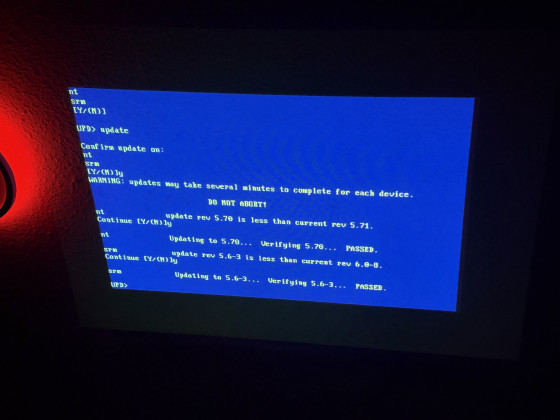
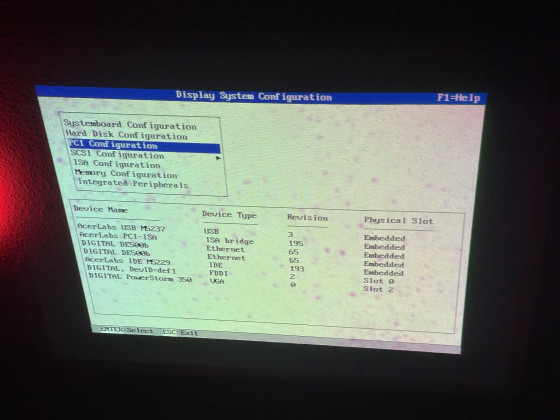
AlphaBIOS pages:
Some of the visible changes in AlphaBIOS
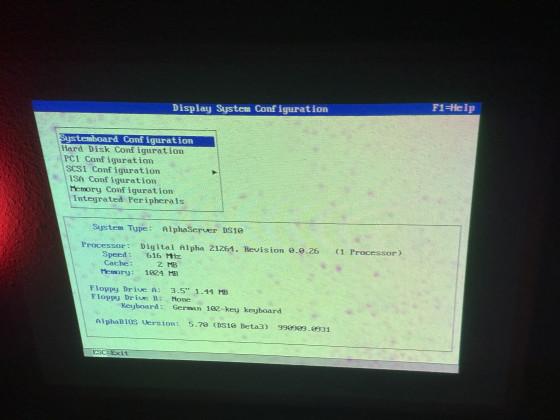
SRM "show config" output:
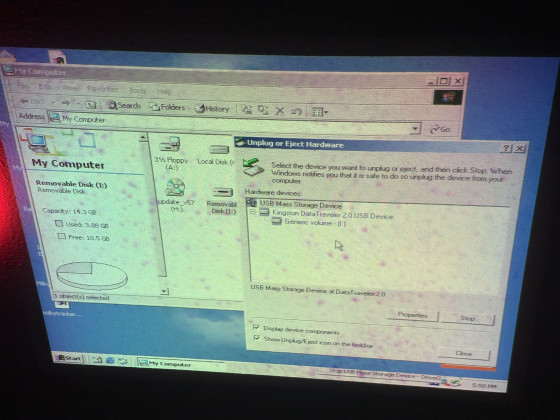
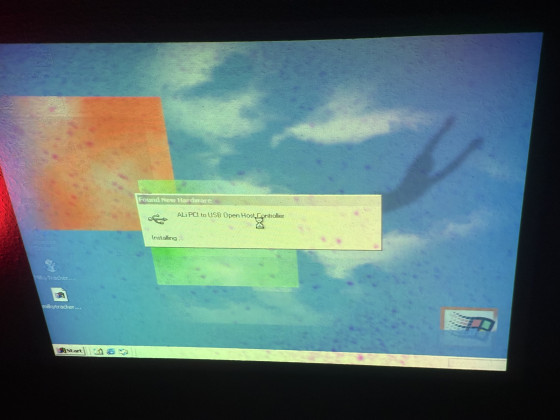
W2k 5.00.2128 proof:
All of this now lets you to boot into Windows and see the fun of working USB!
Linux(???!!?!?!?11!??):
As you can see by this dmesg snippet, if you use linux it works just fine, both usb and Nic and it survives reboots even!
SRM versions up until v5.7 had USB controller enabled in them until they started disabling it since v5.8. It seems like that having the Ali USB controller enabled doesn't break stuff in itself, but that the DE500b NICs start misbehaving and BSODing the machine after the first reboot of the Windows install.
(possible workaround idea by reverting whatever changes are being done by the drivers or whatever to make it boot each time?)
Prerequisites:
DEC Alpha Firmware Update CD-ROM (Mid-2000) burned to a... CD
a DS10 with a CD-ROM drive and without working USB!
SRM+AlphaBIOS downgrade steps:
1. Boot into SRM (hold the halt button if set to AlphaBIOS as default)
2. Type boot dqa0 (or whatever your CD-ROM uses as the device name)
3. Skip the fw update text and wait for the Bootfile: prompt where you can use the default one
5. Wait for it to reboot and perform the update command on the UPD> prompt
6. Continue with all downgrade warnings and wait for it to update 7. Reboot the machine with the exit command
AlphaBIOS pages:
Some of the visible changes in AlphaBIOS
SRM "show config" output:
Code: Select all
>>>show config
COMPAQ AlphaServer DS10 616 MHz
SRM Console: V5.6-3
PALcode: OpenVMS PALcode V1.69-59, Tru64 UNIX PALcode V1.62-54
Processors
CPU 0 Alpha 21264-0 616 MHz SROM Revision: V1.18.208
Bcache size: 2 MB
Core Logic
Cchip DECchip 21272-CA Rev 2
Dchip DECchip 21272-DA Rev 2
Pchip 0 DECchip 21272-EA Rev 2
TIG Rev 2.1
Arbiter Rev 7.30 (0xfe)
MEMORY
Array # Size Base Addr
------- ---------- ---------
0 512 MB 000000000
1 512 MB 020000000
Total Bad Pages = 0
Total Good Memory = 1024 MBytes
PCI Hose 00
Bus 00 Slot 01: Acer Labs M1543C USB
Bus 00 Slot 07: Acer Labs M1543C
Bridge to Bus 1, ISA
Bus 00 Slot 09: DE500-BA Network Controller
ewa0.0.0.9.0 08-00-2B-86-E5-EB
Bus 00 Slot 11: DE500-BA Network Controller
ewb0.0.0.11.0 08-00-2B-86-E3-52
Bus 00 Slot 13: Acer Labs M1543C IDE
dqa.0.0.13.0
dqa0.0.0.13.0 CD-224E
dqb0.0.1.13.0 ST320014 A
dqb1.1.1.13.0 IBM-DJNA -352030
Bus 00 Slot 14: DEC PCI FDDI
fwa0.0.0.14.0 00-60-B0-58-3F-CC
Bus 00 Slot 16: PowerStorm 350
ISA
Slot Device Name Type Enabled BaseAddr IRQ DMA
0
0 MOUSE Embedded Yes 60 12
1 KBD Embedded Yes 60 1
2 COM1 Embedded Yes 3f8 4
3 COM2 Embedded Yes 2f8 3
4 LPT1 Embedded No 3bc 7
5 FLOPPY Embedded Yes 3f0 6 2
W2k 5.00.2128 proof:
All of this now lets you to boot into Windows and see the fun of working USB!
Linux(???!!?!?!?11!??):
As you can see by this dmesg snippet, if you use linux it works just fine, both usb and Nic and it survives reboots even!
Code: Select all
[ 0.000000] Linux version 6.8.7-t2 (root@7950x) (alpha-t2-linux-gnu-kcc (T2 SDE) 13.2.1 20240405, GNU ld (GNU Binutils) 2.42) #1 SMP Tue Apr 23 02:47:49 CEST 2024
[ 0.000000] Booting GENERIC on Tsunami variation Webbrick using machine vector Webbrick from SRM
[ 0.000000] Major Options: SMP MAGIC_SYSRQ
[ 0.000000] Command line: root=/dev/sdb2
[ 0.000000] memcluster 0, usage 1, start 0, end 256
[ 0.000000] memcluster 1, usage 0, start 256, end 130978
[ 0.000000] memcluster 2, usage 1, start 130978, end 131072
[ 0.000000] Initial ramdisk at: 0x(____ptrval____) (22410340 bytes)
[ 0.000000] 2048K Bcache detected; load hit latency 18 cycles, load miss latency 112 cycles
[ 0.000000] Console graphics on hose 0
[ 0.000000] SMP: 1 CPUs probed -- cpu_present_mask = 1
[ 0.000000] Zone ranges:
[ 0.000000] DMA [mem 0x0000000000000000-0x00000fffffffdfff]
[ 0.000000] Normal empty
[ 0.000000] Movable zone start for each node
[ 0.000000] Early memory node ranges
[ 0.000000] node 0: [mem 0x0000000000000000-0x000000003fffffff]
[ 0.000000] Initmem setup node 0 [mem 0x0000000000000000-0x000000003fffffff]
[ 0.000000] percpu: Embedded 9 pages/cpu s32192 r8192 d33344 u73728
[ 0.000000] pcpu-alloc: s32192 r8192 d33344 u73728 alloc=9*8192
[ 0.000000] pcpu-alloc: [0] 0
[ 0.000000] Kernel command line: root=/dev/sdb2
[ 0.000000] Dentry cache hash table entries: 131072 (order: 7, 1048576 bytes, linear)
[ 0.000000] Inode-cache hash table entries: 65536 (order: 6, 524288 bytes, linear)
[ 0.000000] Sorting __ex_table...
[ 0.000000] Built 1 zonelists, mobility grouping on. Total pages: 130048
[ 0.000000] mem auto-init: stack:all(zero), heap alloc:off, heap free:off
[ 0.000000] Memory: 990864K/1048576K available (7873K kernel code, 11164K rwdata, 2444K rodata, 336K init, 283K bss, 57712K reserved, 0K cma-reserved)
[ 0.000000] SLUB: HWalign=64, Order=0-3, MinObjects=0, CPUs=1, Nodes=1
[ 0.000000] rcu: Hierarchical RCU implementation.
[ 0.000000] rcu: RCU restricting CPUs from NR_CPUS=32 to nr_cpu_ids=1.
[ 0.000000] Tracing variant of Tasks RCU enabled.
[ 0.000000] rcu: RCU calculated value of scheduler-enlistment delay is 102 jiffies.
[ 0.000000] rcu: Adjusting geometry for rcu_fanout_leaf=16, nr_cpu_ids=1
[ 0.000000] NR_IRQS: 32784
[ 0.000000] rcu: srcu_init: Setting srcu_struct sizes based on contention.
[ 0.000000] HWRPB cycle frequency bogus, and unable to estimate a proper value!
[ 0.009765] Console: colour VGA+ 80x25
[ 0.009765] printk: legacy console [tty0] enabled
[ 0.011718] Calibrating delay loop... 1216.52 BogoMIPS (lpj=593408)
[ 0.020507] pid_max: default: 32768 minimum: 301
[ 0.020507] Mount-cache hash table entries: 2048 (order: 1, 16384 bytes, linear)
[ 0.020507] Mountpoint-cache hash table entries: 2048 (order: 1, 16384 bytes, linear)
[ 0.023437] SMP mode deactivated.
[ 0.024414] RCU Tasks Trace: Setting shift to 0 and lim to 1 rcu_task_cb_adjust=1.
[ 0.025390] Performance events: No support for your CPU.
[ 0.025390] rcu: Hierarchical SRCU implementation.
[ 0.025390] rcu: Max phase no-delay instances is 390.
[ 0.026367] smp: Bringing up secondary CPUs ...
[ 0.026367] smp: Brought up 1 node, 1 CPU
[ 0.026367] SMP: Total of 1 processors activated (1221.77 BogoMIPS).
[ 0.027343] devtmpfs: initialized
[ 0.035156] clocksource: jiffies: mask: 0xffffffff max_cycles: 0xffffffff, max_idle_ns: 1866466235866741 ns
[ 0.035156] futex hash table entries: 256 (order: 1, 16384 bytes, linear)
[ 0.035156] pinctrl core: initialized pinctrl subsystem
[ 0.037109] NET: Registered PF_NETLINK/PF_ROUTE protocol family
[ 0.038085] thermal_sys: Registered thermal governor 'step_wise'
[ 0.039062] PCI host bridge to bus 0000:00
[ 0.039062] pci_bus 0000:00: root bus resource [io 0x0000-0x1ffffff]
[ 0.039062] pci_bus 0000:00: root bus resource [mem 0x00000000-0x3fffffff]
[ 0.039062] pci_bus 0000:00: No busn resource found for root bus, will use [bus 00-ff]
[ 0.039062] pci 0000:00:01.0: [10b9:5237] type 00 class 0x0c0310 conventional PCI endpoint
[ 0.039062] pci 0000:00:01.0: BAR 0 [mem 0x010b0000-0x010b0fff]
[ 0.039062] pci 0000:00:07.0: [10b9:1533] type 00 class 0x060100 conventional PCI endpoint
[ 0.040039] pci 0000:00:09.0: [1011:0019] type 00 class 0x020000 conventional PCI endpoint
[ 0.040039] pci 0000:00:09.0: BAR 0 [io 0x1100-0x117f]
[ 0.040039] pci 0000:00:09.0: BAR 1 [mem 0x010b2000-0x010b23ff]
[ 0.040039] pci 0000:00:09.0: ROM [mem 0x01000000-0x0103ffff pref]
[ 0.040039] pci 0000:00:0b.0: [1011:0019] type 00 class 0x020000 conventional PCI endpoint
[ 0.040039] pci 0000:00:0b.0: BAR 0 [io 0x1180-0x11ff]
[ 0.040039] pci 0000:00:0b.0: BAR 1 [mem 0x010b2400-0x010b27ff]
[ 0.041015] pci 0000:00:0b.0: ROM [mem 0x01040000-0x0107ffff pref]
[ 0.041015] pci 0000:00:0d.0: [10b9:5229] type 00 class 0x0101f0 conventional PCI endpoint
[ 0.041015] pci 0000:00:0d.0: [Firmware Bug]: BAR 0: invalid; can't size
[ 0.041015] pci 0000:00:0d.0: [Firmware Bug]: BAR 1: invalid; can't size
[ 0.041015] pci 0000:00:0d.0: [Firmware Bug]: BAR 2: invalid; can't size
[ 0.041015] pci 0000:00:0d.0: [Firmware Bug]: BAR 3: invalid; can't size
[ 0.041015] pci 0000:00:0d.0: BAR 4 [io 0x1250-0x125f]
[ 0.041015] pci 0000:00:0d.0: BAR 0 [io 0x01f0-0x01f7]: legacy IDE quirk
[ 0.041015] pci 0000:00:0d.0: BAR 1 [io 0x03f6]: legacy IDE quirk
[ 0.041015] pci 0000:00:0d.0: BAR 2 [io 0x0170-0x0177]: legacy IDE quirk
[ 0.041015] pci 0000:00:0d.0: BAR 3 [io 0x0376]: legacy IDE quirk
[ 0.041992] pci 0000:00:0f.0: [1000:000c] type 00 class 0x010000 conventional PCI endpoint
[ 0.041992] pci 0000:00:0f.0: BAR 0 [io 0x1000-0x10ff]
[ 0.041992] pci 0000:00:0f.0: BAR 1 [mem 0x010b2800-0x010b28ff]
[ 0.041992] pci 0000:00:0f.0: BAR 2 [mem 0x010b1000-0x010b1fff]
[ 0.041992] pci 0000:00:0f.0: ROM [mem 0x01080000-0x0109ffff pref]
[ 0.042968] pci 0000:00:10.0: [10ba:0304] type 00 class 0x030000 conventional PCI endpoint
[ 0.043945] pci 0000:00:10.0: BAR 0 [mem 0x40000000-0x43ffffff pref]
[ 0.044921] pci 0000:00:10.0: BAR 1 [mem 0x44000000-0x45ffffff pref]
[ 0.045898] pci 0000:00:10.0: BAR 2 [io 0x1260-0x1267]
[ 0.046874] pci 0000:00:10.0: ROM [mem 0x010a0000-0x010affff pref]
[ 0.049804] pci 0000:00:11.0: [1274:5000] type 00 class 0x040100 conventional PCI endpoint
[ 0.049804] pci 0000:00:11.0: BAR 0 [io 0x1200-0x123f]
[ 0.049804] pci: enabling save/restore of SRM state
[ 0.050781] pci_bus 0000:00: busn_res: [bus 00-ff] end is updated to 00
[ 0.050781] pci 0000:00:10.0: BAR 0 [mem 0x0c000000-0x0fffffff pref]: assigned
[ 0.051757] pci 0000:00:10.0: BAR 1 [mem 0x0a000000-0x0bffffff pref]: assigned
[ 0.052734] pci 0000:00:09.0: ROM [mem 0x09000000-0x0903ffff pref]: assigned
[ 0.052734] pci 0000:00:0b.0: ROM [mem 0x09040000-0x0907ffff pref]: assigned
[ 0.052734] pci 0000:00:0f.0: ROM [mem 0x09080000-0x0909ffff pref]: assigned
[ 0.052734] pci 0000:00:10.0: ROM [mem 0x090a0000-0x090affff pref]: assigned
[ 0.052734] pci 0000:00:01.0: BAR 0 [mem 0x090b0000-0x090b0fff]: assigned
[ 0.052734] pci 0000:00:0f.0: BAR 2 [mem 0x090b1000-0x090b1fff]: assigned
[ 0.052734] pci 0000:00:09.0: BAR 1 [mem 0x090b2000-0x090b23ff]: assigned
[ 0.052734] pci 0000:00:0b.0: BAR 1 [mem 0x090b3000-0x090b33ff]: assigned
[ 0.052734] pci 0000:00:0f.0: BAR 0 [io 0x8000-0x80ff]: assigned
[ 0.052734] pci 0000:00:0f.0: BAR 1 [mem 0x090b4000-0x090b40ff]: assigned
[ 0.052734] pci 0000:00:09.0: BAR 0 [io 0x8400-0x847f]: assigned
[ 0.052734] pci 0000:00:0b.0: BAR 0 [io 0x8480-0x84ff]: assigned
[ 0.052734] pci 0000:00:11.0: BAR 0 [io 0x8800-0x883f]: assigned
[ 0.052734] pci 0000:00:0d.0: BAR 4 [io 0x8840-0x884f]: assigned
[ 0.052734] pci 0000:00:10.0: BAR 2 [io 0x8850-0x8857]: assigned
[ 0.053710] pci_bus 0000:00: resource 4 [io 0x0000-0x1ffffff]
[ 0.053710] pci_bus 0000:00: resource 5 [mem 0x00000000-0x3fffffff]
[ 0.057617] iommu: Default domain type: Translated
[ 0.057617] iommu: DMA domain TLB invalidation policy: lazy mode
[ 0.060546] pci 0000:00:10.0: vgaarb: setting as boot VGA device
[ 0.060546] pci 0000:00:10.0: vgaarb: bridge control possible
[ 0.060546] pci 0000:00:10.0: vgaarb: VGA device added: decodes=io+mem,owns=io+mem,locks=none
[ 0.061523] vgaarb: loaded
[ 0.061523] VFS: Disk quotas dquot_6.6.0
[ 0.061523] VFS: Dquot-cache hash table entries: 1024 (order 0, 8192 bytes)
[ 0.080078] NET: Registered PF_INET protocol family
[ 0.080078] IP idents hash table entries: 16384 (order: 4, 131072 bytes, linear)
[ 0.083007] tcp_listen_portaddr_hash hash table entries: 512 (order: 0, 8192 bytes, linear)
[ 0.083007] Table-perturb hash table entries: 65536 (order: 5, 262144 bytes, linear)
[ 0.083007] TCP established hash table entries: 8192 (order: 3, 65536 bytes, linear)
[ 0.083007] TCP bind hash table entries: 8192 (order: 5, 262144 bytes, linear)
[ 0.084960] TCP: Hash tables configured (established 8192 bind 8192)
[ 0.084960] UDP hash table entries: 512 (order: 1, 16384 bytes, linear)
[ 0.084960] UDP-Lite hash table entries: 512 (order: 1, 16384 bytes, linear)
[ 0.084960] NET: Registered PF_UNIX/PF_LOCAL protocol family
[ 0.085937] pci 0000:00:09.0: CLS mismatch (32 != 64), using 64 bytes
[ 0.085937] Using epoch 1980 for rtc year 46
[ 0.086914] Trying to unpack rootfs image as initramfs...
[ 0.100585] platform rtc-alpha: registered as rtc0
[ 0.100585] platform rtc-alpha: setting system clock to 2026-03-31T00:35:17 UTC (1774917317)
[ 0.101562] Initialise system trusted keyrings
[ 0.102539] workingset: timestamp_bits=46 max_order=17 bucket_order=0
[ 0.102539] Key type asymmetric registered
[ 0.102539] Asymmetric key parser 'x509' registered
[ 0.103515] Block layer SCSI generic (bsg) driver version 0.4 loaded (major 252)
[ 0.103515] io scheduler mq-deadline registered
[ 0.103515] isapnp: Scanning for PnP cards...
[ 0.456054] isapnp: No Plug & Play device found
[ 0.846679] Serial: 8250/16550 driver, 4 ports, IRQ sharing disabled
[ 0.847655] serial8250: ttyS0 at I/O 0x3f8 (irq = 4, base_baud = 115200) is a 16550A
[ 0.852538] serial8250: ttyS1 at I/O 0x2f8 (irq = 3, base_baud = 115200) is a 16550A
[ 0.881835] loop: module loaded
[ 0.881835] PPP generic driver version 2.4.2
[ 0.894530] serio: i8042 KBD port at 0x60,0x64 irq 1
[ 0.895507] serio: i8042 AUX port at 0x60,0x64 irq 12
[ 0.895507] NET: Registered PF_PACKET protocol family
[ 0.919921] Loading compiled-in X.509 certificates
[ 0.954101] Key type .fscrypt registered
[ 0.954101] Key type fscrypt-provisioning registered
[ 1.451171] input: AT Translated Set 2 keyboard as /devices/platform/i8042/serio0/input/input0
[ 2.188475] Freeing initrd memory: 21880K
[ 2.190428] Freeing unused kernel image (initmem) memory: 336K
[ 2.190428] This architecture does not have kernel memory protection.
[ 2.190428] Running /init as init process
[ 2.190428] with arguments:
[ 2.190428] /init
[ 2.190428] with environment:
[ 2.190428] HOME=/
[ 2.190428] TERM=linux
[ 2.249998] udevd[39]: starting version 182
[ 2.484373] tulip0: EEPROM default media type Autosense
[ 2.484373] tulip0: Index #0 - Media 10baseT (#0) described by a 21142 Serial PHY (2) block
[ 2.484373] tulip0: Index #1 - Media 10baseT-FDX (#4) described by a 21142 Serial PHY (2) block
[ 2.484373] tulip0: Index #2 - Media 100baseTx (#3) described by a 21143 SYM PHY (4) block
[ 2.484373] tulip0: Index #3 - Media 100baseTx-FDX (#5) described by a 21143 SYM PHY (4) block
[ 2.491209] net eth0: Digital DS21142/43 Tulip rev 65 at Port 0x8400, 08:00:2b:86:e5:eb, IRQ 29
[ 2.624022] tulip1: EEPROM default media type Autosense
[ 2.624022] tulip1: Index #0 - Media 10baseT (#0) described by a 21142 Serial PHY (2) block
[ 2.624022] tulip1: Index #1 - Media 10baseT-FDX (#4) described by a 21142 Serial PHY (2) block
[ 2.624022] tulip1: Index #2 - Media 100baseTx (#3) described by a 21143 SYM PHY (4) block
[ 2.624022] tulip1: Index #3 - Media 100baseTx-FDX (#5) described by a 21143 SYM PHY (4) block
[ 2.657225] net eth1: Digital DS21142/43 Tulip rev 65 at Port 0x8480, 08:00:2b:86:e3:52, IRQ 30
[ 2.757811] SCSI subsystem initialized
[ 2.801756] usbcore: registered new interface driver usbfs
[ 2.801756] usbcore: registered new interface driver hub
[ 2.801756] usbcore: registered new device driver usb
[ 2.937498] Warning! ehci_hcd should always be loaded before uhci_hcd and ohci_hcd, not after
[ 2.968748] ohci-pci 0000:00:01.0: OHCI PCI host controller
[ 2.968748] ohci-pci 0000:00:01.0: new USB bus registered, assigned bus number 1
[ 2.968748] ohci-pci 0000:00:01.0: irq 10, io mem 0x090b0000
[ 3.127928] sym0: <895> rev 0x2 at pci 0000:00:0f.0 irq 39
[ 3.297849] libata version 3.00 loaded.
[ 3.387693] sym0: Symbios NVRAM, ID 7, Fast-40, LVD, parity checking
[ 3.387693] sym0: open drain IRQ line driver, using on-chip SRAM
[ 3.387693] sym0: using LOAD/STORE-based firmware.
[ 3.388670] sym0: SCSI BUS has been reset.
[ 3.390623] scsi host0: sym-2.2.3
[ 3.446287] scsi host1: pata_ali
[ 3.448240] hub 1-0:1.0: USB hub found
[ 3.449216] hub 1-0:1.0: 2 ports detected
[ 3.491209] scsi host2: pata_ali
[ 3.515623] ata1: PATA max MWDMA2 cmd 0x1f0 ctl 0x3f6 bmdma 0x8840 irq 14 lpm-pol 0
[ 3.515623] ata2: PATA max MWDMA2 cmd 0x170 ctl 0x376 bmdma 0x8848 irq 15 lpm-pol 0
[ 3.682615] ata1.00: ATAPI: CD-224E, 9.9A, max MWDMA2
[ 3.682615] ata1.00: WARNING: ATAPI DMA disabled for reliability issues. It can be enabled
[ 3.682615] ata1.00: WARNING: via pata_ali.atapi_dma modparam or corresponding sysfs node.
[ 3.708005] scsi 1:0:0:0: CD-ROM TEAC CD-224E 9.9A PQ: 0 ANSI: 5
[ 3.870115] ata2.00: ATA-6: ST320014A, 3.07, max UDMA/100
[ 3.870115] ata2.00: 39102336 sectors, multi 0: LBA
[ 3.916990] scsi 2:0:0:0: Direct-Access ATA ST320014A 3.07 PQ: 0 ANSI: 5
[ 4.717771] sr 1:0:0:0: [sr0] scsi3-mmc drive: 24x/24x cd/rw xa/form2 cdda tray
[ 4.717771] cdrom: Uniform CD-ROM driver Revision: 3.20
[ 4.726560] sr 1:0:0:0: Attached scsi CD-ROM sr0
[ 4.813474] sd 2:0:0:0: [sda] 39102336 512-byte logical blocks: (20.0 GB/18.6 GiB)
[ 4.813474] sd 2:0:0:0: [sda] Write Protect is off
[ 4.813474] sd 2:0:0:0: [sda] Mode Sense: 00 3a 00 00
[ 4.813474] sd 2:0:0:0: [sda] Write cache: enabled, read cache: enabled, doesn't support DPO or FUA
[ 4.813474] sd 2:0:0:0: [sda] Preferred minimum I/O size 512 bytes
[ 4.880856] sda: sda1 sda2 < sda5 sda6 sda7 >
[ 4.886716] sd 2:0:0:0: [sda] Attached SCSI disk
[ 6.454098] random: crng init done
[ 7.039058] scsi 0:0:1:0: Direct-Access COMPAQ BD0728A4C4 HPB4 PQ: 0 ANSI: 3
[ 7.039058] scsi target0:0:1: tagged command queuing enabled, command queue depth 16.
[ 7.041988] scsi target0:0:1: Beginning Domain Validation
[ 7.048824] scsi target0:0:1: FAST-40 WIDE SCSI 80.0 MB/s ST (25 ns, offset 31)
[ 7.052730] scsi target0:0:1: Domain Validation skipping write tests
[ 7.052730] scsi target0:0:1: Ending Domain Validation
[ 7.055660] sd 0:0:1:0: Power-on or device reset occurred
[ 7.062496] sd 0:0:1:0: [sdb] 142264000 512-byte logical blocks: (72.8 GB/67.8 GiB)
[ 7.333004] sd 0:0:1:0: [sdb] Write Protect is off
[ 7.333004] sd 0:0:1:0: [sdb] Mode Sense: d3 00 10 08
[ 7.922847] sd 0:0:1:0: [sdb] Write cache: disabled, read cache: enabled, supports DPO and FUA
[ 9.700190] sdb: sdb1 sdb2
[ 9.701166] sd 0:0:1:0: [sdb] Attached SCSI disk
[ 11.991204] EXT4-fs (sdb2): orphan cleanup on readonly fs
[ 11.993157] EXT4-fs (sdb2): mounted filesystem 5e04dcf8-ebf6-40bf-a53e-dd6414040ef5 ro with ordered data mode. Quota mode: none.
[ 14.914054] EXT4-fs (sdb2): re-mounted 5e04dcf8-ebf6-40bf-a53e-dd6414040ef5 r/w. Quota mode: none.
[ 14.972648] EXT4-fs (sdb1): mounting ext3 file system using the ext4 subsystem
[ 15.086906] EXT4-fs (sdb1): mounted filesystem 3be329f2-f2a8-42a1-a848-7597a95e68eb r/w with ordered data mode. Quota mode: none.
[ 15.351554] zram: Added device: zram0
[ 15.391593] zram0: detected capacity change from 0 to 405232
[ 15.451163] Adding 202608k swap on /dev/zram0. Priority:100 extents:1 across:202608k SS
[ 15.863273] udevd[229]: starting version 182
[ 16.114249] alim7101_wdt: Steve Hill <steve@navaho.co.uk>
[ 16.114249] alim7101_wdt: ALi M7101 PMU not present - WDT not set
[ 16.336905] input: PC Speaker as /devices/platform/pcspkr/input/input3
[ 17.094717] input: PS2++ Logitech Wheel Mouse as /devices/platform/i8042/serio1/input/input4
[ 17.964834] mousedev: PS/2 mouse device common for all mice
[ 21.164051] NET: Registered PF_INET6 protocol family
[ 21.166981] Segment Routing with IPv6
[ 21.166981] In-situ OAM (IOAM) with IPv6
Code: Select all
00:01.0 USB controller: ULi Electronics Inc. USB 1.1 Controller (rev 03)
00:07.0 ISA bridge: ULi Electronics Inc. M1533/M1535/M1543 PCI to ISA Bridge [Aladdin IV/V/V+] (rev c3)
00:09.0 Ethernet controller: Digital Equipment Corporation DECchip 21142/43 (rev 41)
00:0b.0 Ethernet controller: Digital Equipment Corporation DECchip 21142/43 (rev 41)
00:0d.0 IDE interface: ULi Electronics Inc. M5229 IDE (rev c1)
00:0f.0 SCSI storage controller: Broadcom / LSI 53c895 (rev 02)
00:10.0 VGA compatible controller: Mitsubishi Electric Corp. AccelGALAXY A2100 [OEM Evans & Sutherland]
00:11.0 Multimedia audio controller: Ensoniq ES1370 [AudioPCI]

- Morc Offline
- Posts: 197
- Joined: Fri Jul 19, 2024 12:23 pm
- Description: 21 | tatar z Biskupovej
Ak som sa volade omýleu tak na mňa kričte. - Contact:
Making sound work on NT on the DS10
NOTICE: We still didn't get to properly resolve the audio situation, incomplete information in front of your eyes.
To make sound work on the NT for the Alpha processors you need atleast:
1. built in WSS card (a case for some Alpha workstations)
2. an ISA audio card
3. a PCI audio card
4. have a different one on the board (usually ES18xx on some Alpha workstations)
Considering that the DS10 was more of a server than a workstation, it lacks any WSS cards, any built-in Ensoniq cards nor ISA slots, the only option is to use a PCI card.
As for PCI cards, the supported list is as follows:
1. Ensoniq AudioPCI ES1370 (warning: no ES1371 nor ES1373!)
2. Lynx Studio Technology LynxONE
Trying to get the ES1370 to work
We currently have three known driver versions for the Ensoniq AudioPCI ES1370:
4.00.16, 4.00.23 [Revision: 49], 4.00.26 [Revision: 198]
The ES1370 is currently working* only** in the top most slot (Slot 3 - IRQ 4) in the DS10.
*Issue being that the card is getting IRQs from a lower range 0-12 and that makes it conflict with various system devices before it gets a chance to properly work.
**The top slot is the only "plug and play" one which sadly has audio stutters, indicating at a IRQ conflict.
Potential mitigation is to apparently use a PCITOOL V1.3 for Alpha and NT V4.0 and V5.0 PCI Configuration Utility tool that was officially released by Compaq/DEC for the Alpha computers with the NT 4. Only issue being that the tool doesn't let you to change the IRQ above 0x0F, which significantly ruins the possibilities of moving the IRQ of the card higher.
The PCI Configuration Tool also lets you to temporarily get the card to work in other PCI slots than the top one by reassigning the IRQ to one, that seems to work with the stutters.
In case of a tougher conflict, a funny bugcheck appears:
More to come sometime later I guess....
Trying to get the LynxONE to work
This is a funny card. It includes not only relays but also a FPGA. More funny info about the card could be, that it has two balanced or unbalanced inputs and outputs (on official cables as XLR connectors!), it does MIDI in and MIDI out and also an external clock signal. It uses a DB25 for the audio + a D-SUB DB15 for the MIDI and external clock. We managed to get two pieces on Superbuy and it took roughly two months to get home.
Some visuals first:
Getting the card work on NT:
There is atleast one known driver version for these LynxONE cards. For Intel and for Alphas. The Alpha build is mirrorred here for historical reasons. To make this card work on NT, just plug it into the computer and install the driver.
That's all.
I am not joking...
This would formally conclude the audio situation under Windows NT, for now...
To make sound work on the NT for the Alpha processors you need atleast:
1. built in WSS card (a case for some Alpha workstations)
2. an ISA audio card
3. a PCI audio card
4. have a different one on the board (usually ES18xx on some Alpha workstations)
Considering that the DS10 was more of a server than a workstation, it lacks any WSS cards, any built-in Ensoniq cards nor ISA slots, the only option is to use a PCI card.
As for PCI cards, the supported list is as follows:
1. Ensoniq AudioPCI ES1370 (warning: no ES1371 nor ES1373!)
2. Lynx Studio Technology LynxONE
Trying to get the ES1370 to work
We currently have three known driver versions for the Ensoniq AudioPCI ES1370:
4.00.16, 4.00.23 [Revision: 49], 4.00.26 [Revision: 198]
The ES1370 is currently working* only** in the top most slot (Slot 3 - IRQ 4) in the DS10.
Code: Select all
PCI slots - from top to bottom
Slot 3 - IRQ 4 (works but stutters, COM1 conflict)
Slot 2 - IRQ 0 (doesn't want to install, System timer conflict)
Slot 1 - IRQ 12 (doesn't want to install, PS/2 mouse conflict)
Slot 0 - IRQ 8 (doesn't want to install, System CMOS/real time clock conflict)
**The top slot is the only "plug and play" one which sadly has audio stutters, indicating at a IRQ conflict.
Potential mitigation is to apparently use a PCITOOL V1.3 for Alpha and NT V4.0 and V5.0 PCI Configuration Utility tool that was officially released by Compaq/DEC for the Alpha computers with the NT 4. Only issue being that the tool doesn't let you to change the IRQ above 0x0F, which significantly ruins the possibilities of moving the IRQ of the card higher.
The PCI Configuration Tool also lets you to temporarily get the card to work in other PCI slots than the top one by reassigning the IRQ to one, that seems to work with the stutters.
In case of a tougher conflict, a funny bugcheck appears:
More to come sometime later I guess....
Trying to get the LynxONE to work
This is a funny card. It includes not only relays but also a FPGA. More funny info about the card could be, that it has two balanced or unbalanced inputs and outputs (on official cables as XLR connectors!), it does MIDI in and MIDI out and also an external clock signal. It uses a DB25 for the audio + a D-SUB DB15 for the MIDI and external clock. We managed to get two pieces on Superbuy and it took roughly two months to get home.
Some visuals first:
Getting the card work on NT:
There is atleast one known driver version for these LynxONE cards. For Intel and for Alphas. The Alpha build is mirrorred here for historical reasons. To make this card work on NT, just plug it into the computer and install the driver.
That's all.
I am not joking...
This would formally conclude the audio situation under Windows NT, for now...
How to (try to) make it boot Linux through the Network
So, what you need is:
- AlphaServer DS10
- An (old) Linux (virtual) machine
- a network
- your Linux Distro of (very little) choice
- time
- AlphaServer DS10
- An (old) Linux (virtual) machine
- a network
- your Linux Distro of (very little) choice
- time

- Morc Offline
- Posts: 197
- Joined: Fri Jul 19, 2024 12:23 pm
- Description: 21 | tatar z Biskupovej
Ak som sa volade omýleu tak na mňa kričte. - Contact:
Compaq PowerStorm 350 in dual-head mode on Windows NT
The Compaq PowerStorm 350 is a very interesting specimen of an Alpha compatible GPU, which not only does 1920x1200 with one card, but also 1920x1200 per monitor with two cards on NT, 1920x1200 per monitor with THREE CARDS on NT and even FOUR CARDS SUPPOSEDLY OUTPUTTING 1920x1200 PER CARD ON OpenVMS/Tru64!
I currently only have two cards on hands at this point (one being with Leandro and the other one in swarm's Alpha workstation) so I can only try dual monitors.
To make this work, the bottom most card is going to be the main monitor, with the other cards needing to have their VGA ENABLE switch set to disabled. In NT you just need to change the resolution to the one from the list which got populated with more resolutions.
This is how are my PowerStorms enumerated in SRM:
Notice that they are seemingly using the vg* prefix for all video cards.
This is how the GPUs look inside of the PCI Configuration list in AlphaBIOS: Note how the secondary one (Slot 2) is showing not as VGA but as Video card.
How does it look under Windows NT?
This is how it looks when running at 1280x480:
This is how it looks when running at 3820x1200:
A pic on real monitors, just to give you an idea how crazy it all looks and feels:
I currently only have two cards on hands at this point (one being with Leandro and the other one in swarm's Alpha workstation) so I can only try dual monitors.
To make this work, the bottom most card is going to be the main monitor, with the other cards needing to have their VGA ENABLE switch set to disabled. In NT you just need to change the resolution to the one from the list which got populated with more resolutions.
This is how are my PowerStorms enumerated in SRM:
Code: Select all
PCI Hose 00
Bus 00 Slot 07: Acer Labs M1543C
Bridge to Bus 1, ISA
Bus 00 Slot 09: DE500-BA Network Controller
ewa0.0.0.9.0 00-10-64-30-F3-79
Bus 00 Slot 11: DE500-BA Network Controller
ewb0.0.0.11.0 00-10-64-30-F3-78
Bus 00 Slot 13: Acer Labs M1543C IDE
dqa.0.0.13.0
dqa0.0.0.13.0 SINTECHI HighSpeed S
dqb0.0.1.13.0 Compaq CRD-8402B
Bus 00 Slot 14: NCR 53C895
pka0.7.0.14.0 SCSI Bus ID 7
Bus 00 Slot 15: PowerStorm 350
vga0.0.0.15.0
Bus 00 Slot 16: PowerStorm 350
vgb0.0.0.16.0
Bus 00 Slot 17: 114210B5/114210B5
This is how the GPUs look inside of the PCI Configuration list in AlphaBIOS: Note how the secondary one (Slot 2) is showing not as VGA but as Video card.
How does it look under Windows NT?
This is how it looks when running at 1280x480:
This is how it looks when running at 3820x1200:
A pic on real monitors, just to give you an idea how crazy it all looks and feels: